

Key takeaways
- Boat decks, construction sites, and severe weather: Dell Latitude 7030 Rugged Extreme Tablet.
- Windows software, barcode equipment, or specialized ports: Panasonic Toughbook G2.
- One-handed use, hiking, inspections, and light field data collection: Getac ZX80.
- Android apps, cellular connectivity, and lower total cost: Samsung Galaxy Tab Active5 Pro.
- Bright-sun work where glove use matters: Choose a tablet with at least 800 nits, a resistive or glove-capable touchscreen mode, and physical buttons.
The best rugged tablets for demanding field work are the Dell Latitude 7030 Rugged Extreme for maximum Windows durability, the Panasonic Toughbook G2 for modular field computing, the Getac ZX80 for lightweight Android work, and the Samsung Galaxy Tab Active5 Pro for a more affordable, familiar mobile platform.
Our top picks
![AGM PAD P2 Active Rugged Android 14 Tablet with Case, Waterproof & Drop-Proof, Widevine L1 & GMS Certified, 11" 90Hz FHD 480 NITS Display, MTK G99, 8000 mAh, 16(8+8) + 256GB[TF 2TB], GPS, Compass, OTG](https://m.media-amazon.com/images/I/411JDlJ3WrL._SL500_.jpg)


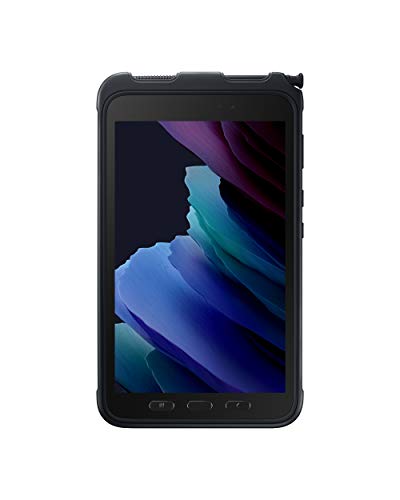
As an Amazon Associate we earn from qualifying purchases at no extra cost to you. Ratings are shown as listed on Amazon.
Quick picks by working situation
- Boat decks, construction sites, and severe weather: Dell Latitude 7030 Rugged Extreme Tablet.
- Windows software, barcode equipment, or specialized ports: Panasonic Toughbook G2.
- One-handed use, hiking, inspections, and light field data collection: Getac ZX80.
- Android apps, cellular connectivity, and lower total cost: Samsung Galaxy Tab Active5 Pro.
- Bright-sun work where glove use matters: Choose a tablet with at least 800 nits, a resistive or glove-capable touchscreen mode, and physical buttons.
Rugged tablet comparison
Specifications vary by processor, battery, keyboard, and regional configuration. The figures below describe commonly published configurations and should be checked against the exact model before purchase.
| Tablet | Screen and brightness | Weight and battery | Protection | Operating system and connectivity |
|---|---|---|---|---|
| Dell Latitude 7030 Rugged Extreme | 10.5-inch, 1920 × 1200, up to 1,400 nits | About 2.2 kg; dual hot-swappable batteries, roughly 58 Wh combined depending on configuration | IP65; MIL-STD-810H; drop protection from approximately 1.2 m in published specifications | Windows 11 Pro; Wi-Fi 6E and optional 4G/5G cellular; USB-C, USB-A, Ethernet, serial and expansion options |
| Panasonic Toughbook G2 | 10.1-inch, 1920 × 1200, up to 1,000 nits | About 1.2 kg tablet-only; removable battery, commonly around 50 Wh | IP65; MIL-STD-810H; drop resistance varies by configuration and accessory | Windows 11 Pro; optional 4G/5G; USB-A, USB-C, Ethernet, serial and modular expansion areas |
| Getac ZX80 | 8-inch, 1280 × 800, up to 1,000 nits | About 0.8 kg; approximately 4,420 mAh battery | IP67; MIL-STD-810H; approximately 1.8 m drop rating in published specifications | Android; Wi-Fi 6 and optional 4G LTE; USB-C, pogo-pin expansion and programmable buttons |
| Samsung Galaxy Tab Active5 Pro | 10.1-inch, 1920 × 1200, approximately 600 nits | About 0.8 kg before some accessories; approximately 10,100 mAh battery | IP68 with protective case; MIL-STD-810H claims; drop protection depends on the supplied case and test method | Android; Wi-Fi and cellular versions; USB-C, pogo pins, microSD and optional barcode or keyboard accessories |
What matters more than the headline drop rating?
Drop protection
A drop rating is useful only when the test height, surface, orientation, and installed accessories are clear. A tablet rated for a 1.2-metre drop may survive repeated handling better than a consumer tablet in a thin case, but no rating guarantees survival after a corner impact onto concrete. A shoulder strap, hand strap, and raised bezel often prevent more damage than a small difference in laboratory drop height.
For field work, inspect the vulnerable parts: screen corners, port doors, battery latches, camera glass, and the seam around the display. A tablet used on a fishing boat should also have a lanyard attachment and a case that remains secure when wet.
Waterproofing and salt exposure
IP65 protects against dust and water jets. IP67 adds protection against temporary immersion, while IP68 indicates a higher or manufacturer-defined immersion condition. These ratings do not mean that every port can remain open, that salt water is harmless, or that the tablet can be charged while wet.
Salt spray is particularly hard on USB connectors, pogo pins, charging contacts, and battery terminals. After use near seawater, power the tablet down if practical, disconnect accessories, rinse external surfaces with fresh water according to the manufacturer’s cleaning instructions, and dry the port area completely. Do not force compressed air into seals or charge through a damp connector.
Screen brightness and glove usability
Brightness is one of the clearest differences between rugged tablets. Around 400 to 600 nits can work under cloud or shade, but 800 to 1,400 nits is a safer target for direct sunlight. A matte or anti-reflective finish is also important: a very bright glossy screen can still be difficult to read when it reflects the sky or water.
Glove operation depends on more than the word “rugged.” Thick waterproof gloves may not register reliably on an ordinary capacitive panel. Look for glove, wet-touch, or rain-touch modes, then confirm that the mode works with the gloves you actually wear. Physical navigation buttons are valuable when a user cannot remove gloves to zoom a chart or acknowledge an alert.
For fishing and marine work, test the screen with wet fingertips, polarized sunglasses, and the device mounted at the angle where it will be used. Polarization can make some displays appear unusually dark in portrait or landscape orientation.
Windows versus Android in the field
Choose Windows when the software is specialized
Windows tablets are usually the safer choice for desktop charting programs, legacy inventory systems, GIS applications, serial-connected instruments, USB peripherals, and company-managed VPNs. The Toughbook G2 and Dell Latitude 7030 also offer more conventional ports and docking choices than most Android tablets.
The tradeoff is size, cost, and maintenance. Windows rugged tablets commonly cost roughly $1,500 to more than $3,500 depending on processor, memory, cellular radio, warranty, and accessories. They also consume more power under sustained workloads.
Choose Android for mobility and simpler deployment
Android tablets are often lighter, faster to wake, and easier to use for mapping, forms, photographs, messaging, point-of-sale work, and cloud applications. The Getac ZX80 is especially practical when a large screen is less important than one-handed operation. The Galaxy Tab Active5 Pro offers a more familiar mobile experience and typically falls in a lower general market range, often about $700 to $1,300 depending on cellular and business-support options.
Before choosing Android, confirm that the required app supports the exact Android version, offline operation, external GPS, barcode hardware, and your organization’s mobile-device management system. Consumer-style update policies can also differ substantially from enterprise Windows support agreements.
Battery life, hot swapping, and cellular options
Published runtime figures are not directly comparable. A tablet displaying a static video at reduced brightness will last much longer than one running maximum brightness, GPS, cellular data, Bluetooth, and a mapping application in cold weather.
Hot-swappable batteries are more valuable than a large laboratory runtime when the tablet is used for a full shift. For example, if a device consumes an average of 8 watts and has a usable 50-Wh battery, the simple runtime estimate is:
50 Wh ÷ 8 W = 6.25 hours
Allowing for cold temperatures, battery aging, screen brightness, and radio use, planning around 70% of that result gives approximately 4.4 hours of dependable working time. A second battery or vehicle charger may therefore matter more than buying a slightly faster processor.
Cellular versions are worthwhile when the tablet must upload catches, inspection records, GPS tracks, or photographs away from Wi-Fi. Confirm supported bands with the carrier, and remember that cellular coverage is not guaranteed offshore. A dedicated GPS receiver may also be preferable for applications that require consistent accuracy or external antenna support.
Ports and mounting: the overlooked buying decision
Count the connections before buying. A USB-C port may handle charging and data but not every display, Ethernet adapter, or serial accessory. Field technicians may need USB-A for older instruments, Ethernet for commissioning equipment, serial for industrial hardware, HDMI or DisplayPort for a monitor, and a microSD slot for offline maps.
Modular port covers are useful but are also common wear points. Ask whether replacement doors, batteries, styluses, docks, hand straps, vehicle mounts, and keyboards remain available for the expected ownership period. A tablet with fewer built-in ports may be the better choice if the manufacturer supplies a secure dock rather than a collection of loose adapters.
Ownership realities and maintenance
- Inspect seals: Replace damaged port doors and battery gaskets before wet-weather work.
- Protect the screen: A scratched anti-glare coating can reduce outdoor readability long before the tablet stops working.
- Clean carefully: Use the manufacturer’s approved cleaner and a soft cloth; avoid abrasive pads, solvents, and high-pressure spray.
- Manage batteries: Keep spare batteries cool and dry, and replace packs that swell, lose capacity rapidly, or fail to latch securely.
- Use offline data: Download maps, forms, and manuals before leaving coverage rather than relying on a cellular connection.
- Secure the device: Use a tether on boats, ladders, and moving vehicles. A rugged tablet can survive a drop but still be lost overboard.
Bottom line
Choose the Dell Latitude 7030 Rugged Extreme when maximum protection, bright sunlight readability, Windows compatibility, and replaceable power are the priorities. Choose the Panasonic Toughbook G2 when modular ports and long-term enterprise support justify its price. Choose the Getac ZX80 for the lightest serious field tablet, and the Samsung Galaxy Tab Active5 Pro when Android, cellular access, and a lower purchase cost fit the workflow. In every case, buy the exact cellular, battery, port, and screen configuration that matches the work; the base model’s headline specification is rarely the whole field-use experience.

Write Your Review
No reviews yet. Be the first to share your experience!