

Key takeaways
- Look for 32GB of DDR5-6000 memory, preferably in two modules.
- Choose a 1TB NVMe SSD at minimum; large games can consume 100GB or more each.
- Allow at least two front fans and one rear exhaust fan.
- A 650W power supply from a reputable manufacturer is generally appropriate.
The best budget gaming PCs for 1080p are built around a Ryzen 5 7600 or Core i5-14400F with a Radeon RX 7600 or GeForce RTX 4060, while the best value for 1440p is a Ryzen 5 7600 paired with a Radeon RX 9060 XT 16GB or GeForce RTX 5060 Ti 16GB.
Our top picks
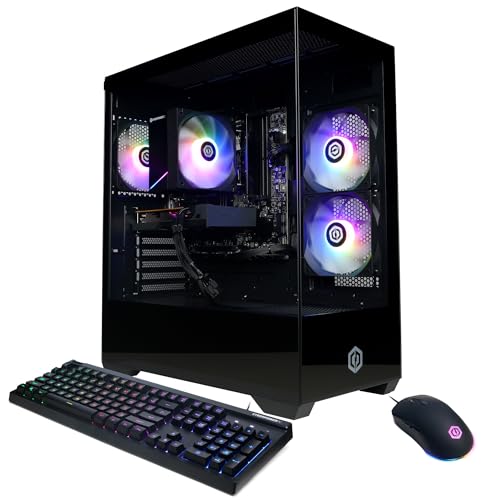



As an Amazon Associate we earn from qualifying purchases at no extra cost to you. Ratings are shown as listed on Amazon.
Best budget gaming PCs at a glance
These recommendations focus on sensible prebuilt configurations rather than the cheapest possible listings. The important differences are graphics memory, platform upgradeability, storage, cooling, and the physical size of the case. Prices are broad 2026 market ranges and vary by operating system, sales, and included components.
| Rank | Best for | CPU/GPU pairing | Memory and storage | Typical 1080p performance | Typical 1440p performance | Approximate price |
|---|---|---|---|---|---|---|
| 1 | Balanced budget gaming | Ryzen 5 7600 / Radeon RX 9060 XT 16GB | 32GB DDR5 / 1TB NVMe SSD | 120–180 fps | 75–120 fps | $900–$1,150 |
| 2 | Compact 1080p gaming | Ryzen 5 7600 / Radeon RX 7600 8GB | 16GB DDR5 / 1TB NVMe SSD | 85–140 fps | 55–85 fps | $700–$900 |
| 3 | Ray tracing and upscaling | Core i5-14400F / GeForce RTX 5060 8GB | 16GB DDR5 / 1TB NVMe SSD | 100–165 fps | 65–100 fps | $800–$1,050 |
| 4 | High-refresh 1440p | Ryzen 5 7600 / GeForce RTX 5060 Ti 16GB | 32GB DDR5 / 1TB NVMe SSD | 140–220 fps | 85–135 fps | $1,000–$1,300 |
| 5 | Lowest sensible entry price | Ryzen 5 5600 / Radeon RX 6600 | 16GB DDR4 / 1TB NVMe SSD | 75–120 fps | 45–70 fps | $550–$750 |
Frame-rate ranges assume current 1080p or 1440p output, high-quality settings without extreme ray tracing, and properly configured dual-channel memory. Competitive games such as Counter-Strike 2, Valorant, Fortnite performance mode, and Rainbow Six Siege can run considerably faster. Recent demanding games may require upscaling or reduced settings.
1. Best overall: Ryzen 5 7600 with Radeon RX 9060 XT 16GB
This is the strongest all-round choice when the budget reaches roughly $900 to $1,150. The six-core Ryzen 5 7600 is fast enough for high-refresh gaming and uses the AM5 platform, which leaves room for a future Ryzen processor upgrade. The RX 9060 XT with 16GB of VRAM is better suited to modern 1440p games than an 8GB card, particularly when high-resolution textures are enabled.
Expect roughly 100 to 160 fps in many modern 1080p games and 70 to 110 fps at 1440p, depending on the game and settings. This pairing is especially attractive for a buyer who wants to keep the PC for several years without immediately replacing the graphics card.
- Look for 32GB of DDR5-6000 memory, preferably in two modules.
- Choose a 1TB NVMe SSD at minimum; large games can consume 100GB or more each.
- Allow at least two front fans and one rear exhaust fan.
- A 650W power supply from a reputable manufacturer is generally appropriate.
2. Best compact 1080p system: Ryzen 5 7600 with Radeon RX 7600
For a smaller desk or a 1080p monitor, the Ryzen 5 7600 and RX 7600 combination avoids paying for performance that may not be visible at 60 or 144 Hz. It can deliver well over 100 fps in esports games and usually lands between 85 and 140 fps in less demanding single-player titles at high settings.
The RX 7600 has 8GB of VRAM, so it is best treated as a 1080p graphics card. It may need texture reductions in especially demanding releases, but its modest power draw makes it easier to fit into compact cases. A system with a graphics card under 250mm long and a case volume below 25 litres is a practical choice for a small desk.
Choose this option over a cheaper older platform if you value future CPU upgrades. The AM5 motherboard and DDR5 memory cost more initially than an AM4 system, but they provide a clearer upgrade path.
3. Best for ray tracing: Core i5-14400F with GeForce RTX 5060
A Core i5-14400F paired with an RTX 5060 is a sensible pick for players who use ray tracing, streaming tools, or frame-generation features. Nvidia’s software ecosystem can be valuable in games that support DLSS, although the 8GB graphics memory means that the card remains primarily a 1080p choice.
This setup commonly reaches 100 to 165 fps at 1080p in competitive and mainstream games. At 1440p, expect approximately 65 to 100 fps with sensible settings and upscaling where necessary. For ray-traced games, an RTX 5060 may produce a smoother experience than a similarly priced raster-focused card, but it is not the best choice if native 1440p texture quality is the priority.
The i5-14400F has more hybrid CPU cores than a typical six-core budget processor, which helps with background applications. Check the motherboard carefully, however: many low-cost systems use an older LGA1700 board with limited future CPU options. It is a good value purchase, but not the strongest long-term platform.
4. Best 1440p performance: Ryzen 5 7600 with GeForce RTX 5060 Ti 16GB
If a 1440p monitor is already on the desk, the RTX 5060 Ti 16GB is a more comfortable match than an 8GB card. Pairing it with the Ryzen 5 7600 keeps the total system balanced and avoids spending heavily on a processor that adds little gaming performance at this price level.
Depending on the title, this configuration can deliver around 85 to 135 fps at 1440p using high settings. It is also a good fit for a 165Hz monitor in esports games. The 16GB graphics memory provides more headroom for texture packs and future releases, though it does not guarantee high frame rates in every demanding game.
Prioritize this configuration over a faster CPU if the system is mainly for gaming. Upgrade the processor later only if a future high-end graphics card, competitive gaming at very high frame rates, or demanding productivity work creates a real CPU limit.
5. Cheapest sensible option: Ryzen 5 5600 with Radeon RX 6600
A Ryzen 5 5600 and RX 6600 system remains worthwhile when the total budget must stay near $550 to $750. It is capable of smooth 1080p gaming and often exceeds 60 fps at high settings. It is not the right foundation for a new 1440p build, but it offers excellent value for a first gaming PC or a secondary system.
The drawback is the AM4 platform. The Ryzen 5 5600 uses DDR4 and has fewer meaningful upgrade options than AM5. A future upgrade to a Ryzen 7 5700X3D can extend the platform’s gaming life, but replacing the motherboard and memory later may provide better long-term value than repeatedly upgrading within AM4.
How much RAM and SSD storage do you need?
- 16GB RAM: The minimum for a new budget gaming PC. Use two matching modules rather than one 16GB stick.
- 32GB RAM: The better 2026 target for modern games, browsers, voice chat, recording, and modded titles.
- 1TB NVMe SSD: The practical minimum. After Windows and applications, usable space may fall below 900GB.
- 2TB NVMe SSD: Worth considering if you regularly keep 10 or more large games installed.
As a simple capacity calculation, ten games averaging 90GB use about 900GB before the operating system, updates, and free-space overhead are counted. A 1TB drive will therefore feel cramped, while a 2TB drive leaves useful working room.
Decision matrix: which build fits your situation?
| Your situation | Recommended target | Why |
|---|---|---|
| Under $750 and gaming at 1080p | Ryzen 5 5600 / RX 6600 | Strong value, but accept an older upgrade platform. |
| Small desk or living-room setup | Ryzen 5 7600 / RX 7600 in a sub-25-litre case | Lower power draw and easier cooling than larger GPUs. |
| 1440p monitor and long ownership | Ryzen 5 7600 / RX 9060 XT 16GB | More graphics memory and a better AM5 upgrade path. |
| Ray tracing, recording, or streaming | Core i5-14400F / RTX 5060 | Good software support and capable background performance. |
| Competitive games at 165Hz or higher | Ryzen 5 7600 / RTX 5060 Ti 16GB | Higher average and minimum frame rates with room for a fast monitor. |
Ownership details that budget listings often hide
Dust filters and fans are the first maintenance points to check. Clean the front filter every one to three months, depending on pets, carpets, and room dust. A blocked filter raises temperatures and can make fans louder. Do not remove the CPU cooler merely to perform routine cleaning; compressed air held at a distance and a soft brush are usually sufficient.
Prebuilt systems often cut costs with a small SSD, a single memory module, a weak power supply, or a proprietary motherboard. Before buying, confirm the power-supply wattage and connector type, whether a second memory slot is available, and whether the case accepts a standard replacement power supply. Avoid upgrading only the graphics card without checking power capacity, physical clearance, and airflow.
For most buyers, the best budget gaming PCs are not the machines with the lowest sticker price. The best value is the system that combines a modern six-core CPU, dual-channel memory, a 1TB NVMe SSD, a suitable graphics-memory capacity, and a case that can be cleaned and upgraded without replacing half the computer.



Write Your Review
No reviews yet. Be the first to share your experience!